
One form for every kind of work
A marketing campaign and a payroll system change are not the same request. A generic intake queue mixes them until nobody can decide.
project intake software
Project intake software is the front door for work requests. Precision Foundry is built for software change: after the request is written, an IT Owner participates in Intake Review and recommends the right discovery path before a BA facilitates the shared questions. Campaigns, events, and office workflows belong in a different kind of tool.
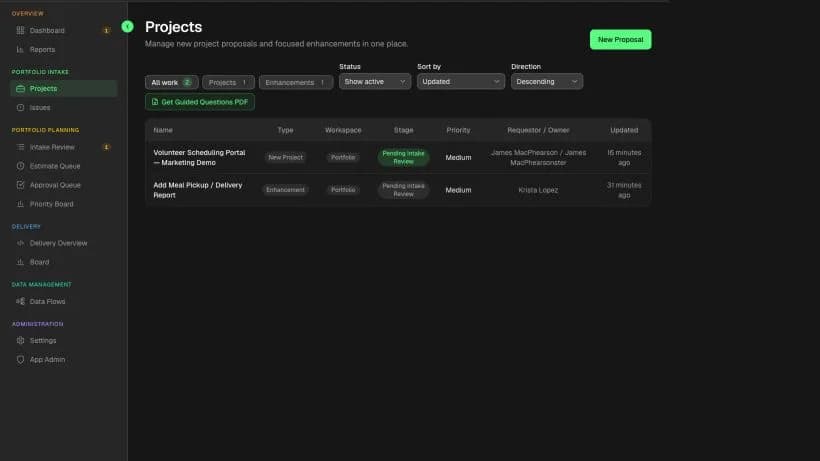
Project intake software should
Search for project intake software and you will find PMO portals, work-OS forms, and service desks. Those tools accept any request. Software change needs a different front door: a complete story before anyone opens a board, and a polite no when the ask is a campaign or an office workflow.
A marketing campaign and a payroll system change are not the same request. A generic intake queue mixes them until nobody can decide.
Service desks and work-OS forms collect a subject line. Reviewers then book meetings to recover the problem the form never asked for.
Charters, RAID logs, and preferred vendors hide the current process. The person closest to the work cannot submit what they already know.
Compare the kind of request each product collects and what happens after submission. This is a fit comparison, not a ranking.
Project intake software tools at a glance
Best for
Internal software changes that begin as a business problem rather than a ready backlog item.
What intake creates
A plain-language request with the current process, affected people, owner, constraints, and intended outcome.
Discovery and review
Early IT triage, one of four discovery recommendations, BA-facilitated questions, separate Business and IT estimates, and a later investment decision.
Decision and delivery path
The approved request stays connected to requirements, epics, sprint work, testing evidence, production issues, and release.
Best for
IT service requests, support queues, service catalogs, and service-management workflows.
What intake creates
A portal submission routed by request type into a service-project queue.
Discovery and review
Configurable forms, workflows, queues, approvals, and service-level tracking help agents review and fulfill requests.
Decision and delivery path
Requests follow the configured service workflow and can connect to Jira work items when software delivery is required.
Best for
Product teams collecting ideas, prioritizing opportunities, and communicating product roadmaps.
What intake creates
A product idea enriched with insights, fields, comments, and supporting context.
Discovery and review
Custom fields, formulas, scoring, views, and team discussion support product discovery and prioritization.
Decision and delivery path
Prioritized ideas can connect to Jira delivery work while product teams track progress against a roadmap.
Best for
General work requests that need a consistent form and routing into a team workflow.
What intake creates
A structured form submission organized as work in an Asana project.
Discovery and review
Custom questions and workflow automation standardize information, assignment, organization, and scheduling.
Decision and delivery path
The resulting work is managed through Asana projects and workflows rather than a software-specific request-to-release lifecycle.
Best for
General-purpose request collection connected to customizable monday.com boards and workflows.
What intake creates
A WorkForm response synchronized to the connected board as structured work data.
Discovery and review
Custom form questions and board automations help teams collect, route, and organize responses.
Decision and delivery path
The response continues as an item in the team's configured board workflow rather than a prescribed software lifecycle.
| Tool | Best for | What intake creates | Discovery and review | Decision and delivery path |
|---|---|---|---|---|
| Precision Foundry | Internal software changes that begin as a business problem rather than a ready backlog item. | A plain-language request with the current process, affected people, owner, constraints, and intended outcome. | Early IT triage, one of four discovery recommendations, BA-facilitated questions, separate Business and IT estimates, and a later investment decision. | The approved request stays connected to requirements, epics, sprint work, testing evidence, production issues, and release. |
| Jira Service Management (official product page) | IT service requests, support queues, service catalogs, and service-management workflows. | A portal submission routed by request type into a service-project queue. | Configurable forms, workflows, queues, approvals, and service-level tracking help agents review and fulfill requests. | Requests follow the configured service workflow and can connect to Jira work items when software delivery is required. |
| Jira Product Discovery (official product page) | Product teams collecting ideas, prioritizing opportunities, and communicating product roadmaps. | A product idea enriched with insights, fields, comments, and supporting context. | Custom fields, formulas, scoring, views, and team discussion support product discovery and prioritization. | Prioritized ideas can connect to Jira delivery work while product teams track progress against a roadmap. |
| Asana Forms (official product page) | General work requests that need a consistent form and routing into a team workflow. | A structured form submission organized as work in an Asana project. | Custom questions and workflow automation standardize information, assignment, organization, and scheduling. | The resulting work is managed through Asana projects and workflows rather than a software-specific request-to-release lifecycle. |
| monday WorkForms (official product page) | General-purpose request collection connected to customizable monday.com boards and workflows. | A WorkForm response synchronized to the connected board as structured work data. | Custom form questions and board automations help teams collect, route, and organize responses. | The response continues as an item in the team's configured board workflow rather than a prescribed software lifecycle. |
Last reviewed: August 2026
We reviewed each vendor's official product pages in August 2026. The comparison describes published intake, review, and delivery workflows without review scores, price claims, or unsupported implementation estimates.
Choose the intake system that matches the work entering the queue and the decisions the system must preserve.
The request starts with a department problem and must survive guided discovery, Business and IT estimates, approval, requirements, testing, and release.
The queue primarily handles support, access, service-catalog, incident, and operational IT requests with agent workflows and SLAs.
Product managers need to collect ideas and insights, score opportunities, and communicate a roadmap before linking selected ideas to delivery.
The organization needs one configurable front door for campaigns, creative work, HR, facilities, and other cross-functional requests.
Project request management software is the same front door under a PMO name. For software change it still has to collect a problem, the people affected, a reachable owner, and known limits—then refuse campaigns and office workflows. A generic request portal that accepts every kind of work is not this job.
PMO intake software is how project offices search the same front door. For software change it still has to collect a complete request and refuse campaigns, events, and office workflows. A PMO portal that scores every kind of work is a mixed queue with a governance label.
The request does not jump straight into a questionnaire. An assigned or company IT Owner first recommends Standard Discovery, Lightweight Discovery, Existing Solution Review, or Not an IT Project and identifies any Security, Vendor, Data, or Architecture review. A Approver can then mark it Ready for Discovery without pretending the investment is already approved.
The job starts by making one request understandable, then bringing IT into Intake Review before discovery. Ready for Discovery opens the recommended path; it does not fund the work. Portfolio approval and delivery remain later jobs.
Start with what happens today, who is involved, and why the existing path is not good enough—in everyday words.
Attach a reachable business owner, timing windows, vendors that cannot move, and policies that already apply.
An IT Owner flags Security, Vendor, Data, or Architecture involvement and recommends Standard Discovery, Lightweight Discovery, Existing Solution Review, or Not an IT Project.
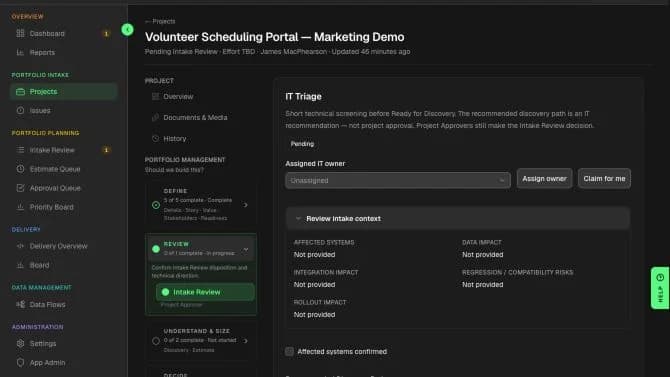
In the product
A complete request moves to Intake Review, where IT Triage recommends the right discovery path without turning the intake form into technical design.
Results
When project intake software is built for software change, a stranger to the request can name the problem, the people, the owner, and the limits. That is the handoff into questions—not a charter and not a backlog.
Common questions
Project intake software is how an organization collects and reviews incoming work requests in one place. Precision Foundry is project intake software for software change: a complete request with a problem, people, owner, and constraints. It is not a campaign tracker and it is not a service desk.
Project intake software is the category buyers search. Software project intake is the software-only version of that job. Same front door, narrower work: a system change, not an event or an office workflow.
No. Those requests need a work-management tool. Precision Foundry treats every item as a software change. Mixing campaign intake into this queue is how the wrong traffic arrives.
It replaces the translator tax at the front door. The person closest to the work submits the request in everyday language. A reviewer checks completeness. A project office is not required to collect the story.
Intake Review brings in an IT Owner before guided questions begin. IT recommends Standard Discovery, Lightweight Discovery, Existing Solution Review, or Not an IT Project and flags specialist reviews. Ready for Discovery starts the chosen path; a BA facilitates the shared questions, and investment approval waits for discovery and both estimates.
Yes, for software change. Project request management software is how many PMO teams search the same front door. Precision Foundry still collects a complete software request—not a generic work ticket.
See how project intake software captures a complete software ask without a PMO form or a service-desk ticket.
Request Private AlphaOptional cookies
We use optional technologies only with your choice. Strictly necessary cookies for sign-in and security always run. Cookie Policy