
The form is a request type
JSM fields exist so an agent can route a ticket. They do not collect the current process, the people, or the outcome that would make a software change worth doing.
JSM software intake
This article is the workflow story, not a feature chart. Jira Service Management is the wrong software intake when a portal form creates a ticket and the requestor’s people, constraints, and owner die in that work item. Walk the failure steps. Leave the product matrix for the comparison page.
For IT and PMO partners who already run Jira Service Management and keep finding system-change work filed as portal tickets.
A software request that starts in JSM usually loses
Employees already know the JSM portal. When that is the only door, a new system or a meaningful change arrives as a request type. An agent assigns it. Comments become the spec. Later QA—if anyone invites them—tests the ticket. Software intake needed a story, an owner, and a decision. It received a queue.
JSM fields exist so an agent can route a ticket. They do not collect the current process, the people, or the outcome that would make a software change worth doing.
First-response targets reward speed. A software request needs completeness and a paired estimate, not a two-hour acknowledgement.
Agents paraphrase. Requestors add comments. Testers open the work item. The original software ask is gone.
Keep the service desk for service work. Give software change a different door: a complete request, a review, and a recorded decision. Do not add another JSM request type and call it intake.
The service desk is the wrong door. Put the software ask on software project intake so reviewers see a complete request instead of a portal ticket.
Once the story is understandable, requirements gathering software turns it into reviewed answers—without pasting the JSM description into a spec.
If the only path today is a request type, start the replacement with software project intake and leave JSM for frontline support, access requests, and catalog items.
Write down what belongs in JSM and what does not. Frontline support, access requests, and catalog items stay. New systems and meaningful software changes leave. Production issues that need analysis, approval, delivery work, and testing go to Foundry.
If the employee needs a password reset, access, or a frontline break-fix, it is a ticket. If they are asking to change or replace software, it is a software request. If a production defect needs investigation, approval, delivery work, and a tested fix, it is a Foundry issue. One sentence on the portal prevents most misfiles.
Ask what happens today, who is affected, the outcome that would make the change worth doing, a reachable owner, and known constraints.
Those answers are the intake. A summary line, a priority, and a preferred vendor are not. If the requestor cannot name who hurts, send it back—do not open a ticket to ‘get it moving.’
A reviewer checks whether a stranger can understand the ask. Completeness beats first-response time.
Ready enough means problem, people, outcome, owner, and limits are present. Missing solution design is expected. Missing who is affected is not. JSM’s clock does not apply.
Size training and adoption next to the build. A ticket assignee is not an investment decision.
If only the technical hours exist, the case is a development quote. Write the business estimate on the same record. Then leaders can say yes, no, or not yet.
Requirements, stories, testing, and release stay on the Foundry thread. JSM does not become the backlog.
If engineering already lives in Jira Software, point the work item at the living request. Do not paste the portal ticket into an epic description and call that the spec.
Visual proof
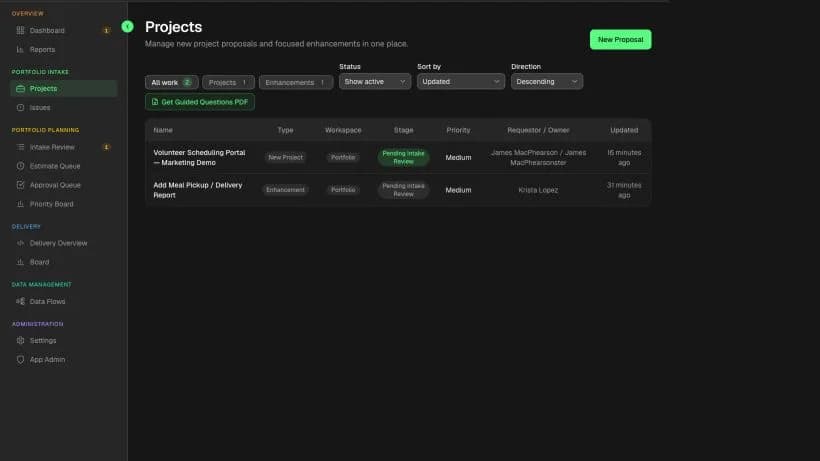
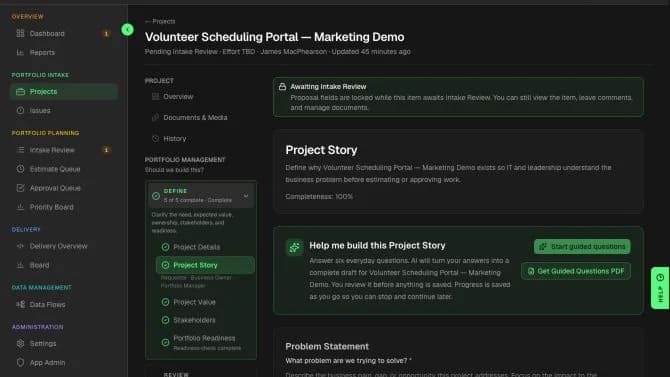
A portal form creates a work item. Foundry keeps the requestor’s people, constraints, and owner on the thread that later becomes requirements, a sprint, and QA.
Foundry submission
Jira-ready epic
Jira-ready sprint epic
Pointer to the Foundry thread—not a paste of the intake form into a Jira description.
If engineering must sprint in Jira, create one Epic for the approved Foundry delivery record and paste the stable Foundry link into that Epic. Child stories and tasks can stay in Jira without separate Foundry links.
This is the manual handoff model. Foundry holds the living request. One Jira Epic carries the stable pointer; engineering manages its child work in Jira when Jira owns execution.
What the Jira epic should inherit—not retype
Jira epic field
Epic summary and reporter
What survives
The person closest to the problem stays visible
Jira epic field
Epic description as a pointer, not a rewrite
What survives
QA can open the original words
Jira epic field
Sprint commitment only after the recorded yes
What survives
Training and adoption are not dropped at the paste
Jira epic field
Linked acceptance / definition of done
What survives
Out-of-scope work does not appear as new tickets
Jira epic field
Child stories and tasks managed in Jira
What survives
Engineering derives child work from the reviewed requirements; each child does not need a separate Foundry link
| Foundry field | Jira epic field | What survives |
|---|---|---|
| Proposal name and requestor | Epic summary and reporter | The person closest to the problem stays visible |
| Business problem and first-release outcome | Epic description as a pointer, not a rewrite | QA can open the original words |
| Business and technical estimates | Sprint commitment only after the recorded yes | Training and adoption are not dropped at the paste |
| Named exclusions and constraints | Linked acceptance / definition of done | Out-of-scope work does not appear as new tickets |
| Reviewed business and functional requirements | Child stories and tasks managed in Jira | Engineering derives child work from the reviewed requirements; each child does not need a separate Foundry link |
Practical template
Use this at the portal and at triage. If the row points at software change, do not open a JSM ticket as the system of record. Examples are fictional.
Software-or-service checklist
Why it matters
A frontline break-fix belongs in the service desk. A production software issue that needs analysis, approval, delivery work, and testing belongs in Foundry.
What to do
The badge reader fails on the east door—file it in JSM. A checkout defect that needs a tested fix—open a Foundry production issue.
Why it matters
That is a service request with an SLA.
What to do
Provision a laptop or reset a mailbox. Keep it in JSM.
Why it matters
That is software demand. A ticket will erase the story.
What to do
Replace volunteer scheduling email with software. Open a software request.
Why it matters
A solution-first portal field hides the current process.
What to do
Send back: what happens today, who is affected, what better looks like.
Why it matters
Follow-up questions need a name. A reporter is not an owner.
What to do
Return the request until an operations lead will answer.
Why it matters
Speed rewards incomplete software asks.
What to do
Pause the SLA. Review completeness. Then estimate both sides.
Why it matters
The ticket has already replaced the request.
What to do
Move the living answers onto one request thread. Stop adding spec to the issue.
| Signal | Why it matters | What to do |
|---|---|---|
| Something that already exists is broken | A frontline break-fix belongs in the service desk. A production software issue that needs analysis, approval, delivery work, and testing belongs in Foundry. | The badge reader fails on the east door—file it in JSM. A checkout defect that needs a tested fix—open a Foundry production issue. |
| Someone needs access or a catalog item | That is a service request with an SLA. | Provision a laptop or reset a mailbox. Keep it in JSM. |
| They want a new system or a meaningful change | That is software demand. A ticket will erase the story. | Replace volunteer scheduling email with software. Open a software request. |
| They named a vendor or a feature list first | A solution-first portal field hides the current process. | Send back: what happens today, who is affected, what better looks like. |
| There is no reachable business owner | Follow-up questions need a name. A reporter is not an owner. | Return the request until an operations lead will answer. |
| The only clock is an SLA | Speed rewards incomplete software asks. | Pause the SLA. Review completeness. Then estimate both sides. |
| Comments are becoming the spec | The ticket has already replaced the request. | Move the living answers onto one request thread. Stop adding spec to the issue. |
Worked example
A facilities lead files “need a scheduling tool” through the portal. An agent assigns it. Three months later QA tests the ticket summary.
What happens when a software ask starts as a JSM ticket
What we recorded
“Software / other” in the employee portal
What we recorded
Summary, urgency, preferred vendor name
What we recorded
Today’s spreadsheet process, who is blocked, and a business owner
What we recorded
Assigned an analyst and started the SLA clock
What we recorded
The ticket description and the last twenty comments
What we recorded
A complete software request, both estimates, and a recorded yes
| Check | What we recorded |
|---|---|
| Request type | “Software / other” in the employee portal |
| What the form captured | Summary, urgency, preferred vendor name |
| What it missed | Today’s spreadsheet process, who is blocked, and a business owner |
| What the agent did | Assigned an analyst and started the SLA clock |
| What QA opened | The ticket description and the last twenty comments |
| What would have been enough | A complete software request, both estimates, and a recorded yes |
The portal did its job: it created a ticket. That is why it is the wrong software intake. Service desks resolve tickets. Software change needs a request that can survive review, estimates, and QA.
What JSM collects vs. what software intake needs
Software request
What happens today, in the requestor’s words
Software request
A reachable business owner for follow-up questions
Software request
A completeness review, then dual estimates
Software request
One thread testers can still open at release
| JSM portal ticket | Software request |
|---|---|
| Request type, urgency, and a summary line | What happens today, in the requestor’s words |
| Reporter and an assigned agent | A reachable business owner for follow-up questions |
| An SLA clock and a queue | A completeness review, then dual estimates |
| Comments that become the live spec | One thread testers can still open at release |
A new form that still creates a ticket keeps the same failure. The object is wrong, not the field list.
Acknowledging a software ask in two hours does not make it reviewable. Pause the clock or take it off the desk.
That is a third document. The portal issue, the epic, and the original ask will disagree.
Testers will verify the paraphrase. Give them the living request or accept that you are testing the handoff.
In Precision Foundry
The method above is operational: two doors, a complete story, a completeness review, then estimates before anyone assigns an agent. Precision Foundry stores that same data thread so the QA tester opens what the business user wrote—not what an agent typed into a ticket.
Common questions
Because a portal form creates a service ticket. Software intake needs a complete request—current process, people, owner, constraints—and a decision. Ticket fields, SLAs, and agent comments replace that story.
Yes. Keep JSM for frontline support, access requests, service catalogs, and SLAs. Use a software-request path for new systems and meaningful changes. Use Foundry for production issues that need analysis, approval, delivery work, and a tested resolution. The products can sit next to each other.
Required fields still create a work item. Completeness for software change is a reviewable story, not a populated ticket. If QA later opens the issue, you already lost the request.
A software-request path that collects the current situation, the people, the outcome, an owner, and constraints. Precision Foundry is built for that submission. The portal can link to it and still handle tickets.
Same failure, different Atlassian product. JSM starts the paraphrase at the portal. Jira Software starts it at the work item. In both cases the tester never sees the original request.
On the comparison page. This article stays on the operational failure: what happens when a software ask is filed as a portal ticket, comment by comment, until QA tests the paraphrase.
Precision Foundry keeps this guide attached to the request so the template does not live in a forgotten doc.
Request Private AlphaOptional cookies
We use optional technologies only with your choice. Strictly necessary cookies for sign-in and security always run. Cookie Policy