
The tracker fields are the wrong shape
Summary, description, and acceptance criteria are built for work items. They are a poor home for a business problem, affected roles, constraints, and a first-release outcome.
Intake into Jira
Pasting a charter, an intake email, or a form export into a Jira work item looks like a clean handoff. It is how the requestor’s context dies and how engineering backlog pollution starts: unvetted ideas become official the moment someone hits Create. The backlog gets a summary. The original thread does not travel with the work.
For product operations, PMO partners, and engineering leads who treat “create the Jira tickets” as the moment a request becomes real.
The copy already failed if
Product teams lose an immense amount of context, time, and data when they migrate text from a project charter or intake email into an engineering tracker. The paste feels responsible: engineering has a backlog, so the request must have moved. What actually moved is a summary. Fields do not match. Attachments drop. The “why,” the exclusions, and the people who hurt are flattened into Description. From that moment, every later comment is written against the copy—not against the requestor.
Summary, description, and acceptance criteria are built for work items. They are a poor home for a business problem, affected roles, constraints, and a first-release outcome.
Once the epic exists, nobody opens the charter again. The intake form becomes an archive. Updates happen in Jira, so the original answers go stale and then get ignored.
Testers verify whatever is in the ticket. They cannot see the sentence the business user wrote, so they cannot tell that development implemented the paraphrase.
The fix is not a better Jira template. Templates still create a second record. Keep the intake as the living thread: discovery answers, estimates, the yes, requirements, stories, tests, and release evidence attach to it. If engineering already standardizes on Jira, copy only after that thread is complete—and treat the work item as a pointer, not the spec.
Keep software project intake as the living thread and treat any Jira issue as a pointer, not the spec.
If testers can only open a ticket description, they are not verifying against requirements gathering software—they are testing the handoff.
Finish the request in software project intake, then point work items at it. Do not use the create-issue screen as the moment the story becomes real.
Do not treat “filed in Jira” as the end of intake. The requestor’s words need a home that later answers can join.
An email or a locked PDF cannot accept “we decided public status is out of scope.” A living record can. If the only editable surface is a Jira description, the requestor is already out of the conversation.
Questions about people, rules, data, and integrations should not start a Confluence page that then gets pasted again.
Every extra document is another place the story can fork. The second paste is how “must keep the payment vendor” becomes a comment on a random story, then disappears.
A Jira epic created to ‘get it on the board’ invites the team to size a slogan.
Business effort and technical effort belong next to the problem and the exclusions. Approving a work item is not the same as approving a first-release outcome with named unknowns.
If you must have a tracker, create issues as children of reviewed requirements—not as a fresh rewrite of the intake email.
Retyping is where adjectives change and constraints fall out. A pointer (“see requirement: staff-only status”) is safer than a new paragraph that sounds similar.
The tester should see the business user’s answers, not only the latest Jira description.
That is the difference between a handoff and a system. If the person checking the release cannot see the person who asked for the change, the organization already paid the context tax.
Visual proof
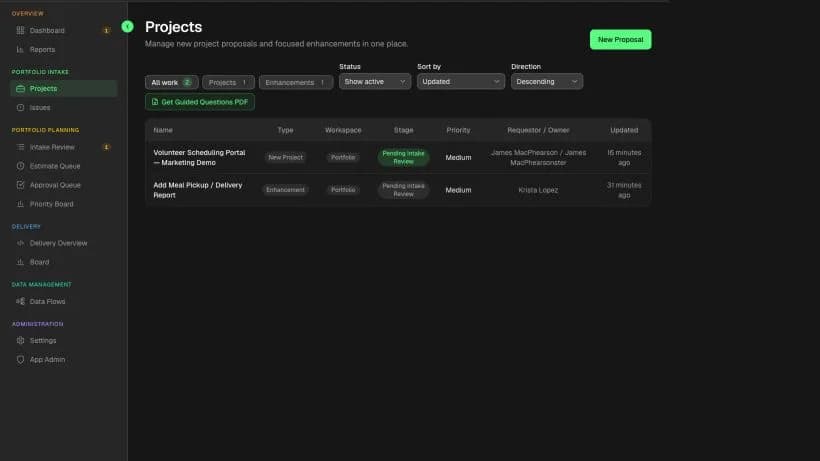
Pasting an intake form into Jira looks like a clean handoff. The screenshots show the alternative: keep the submission structured, then let the epic inherit a pointer—not a flattened Description.
Foundry submission
Jira-ready epic
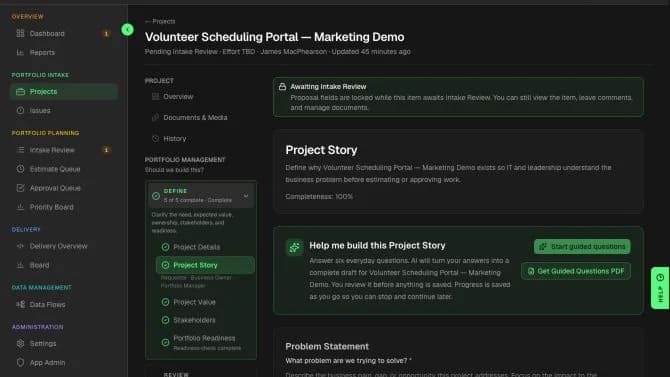
Jira-ready sprint epic
Pointer to the Foundry thread—not a paste of the intake form into a Jira description.
If engineering must sprint in Jira, create one Epic for the approved Foundry delivery record and paste the stable Foundry link into that Epic. Child stories and tasks can stay in Jira without separate Foundry links.
This is the manual handoff model. Foundry holds the living request. One Jira Epic carries the stable pointer; engineering manages its child work in Jira when Jira owns execution.
What the Jira epic should inherit—not retype
Jira epic field
Epic summary and reporter
What survives
The person closest to the problem stays visible
Jira epic field
Epic description as a pointer, not a rewrite
What survives
QA can open the original words
Jira epic field
Sprint commitment only after the recorded yes
What survives
Training and adoption are not dropped at the paste
Jira epic field
Linked acceptance / definition of done
What survives
Out-of-scope work does not appear as new tickets
Jira epic field
Child stories and tasks managed in Jira
What survives
Engineering derives child work from the reviewed requirements; each child does not need a separate Foundry link
| Foundry field | Jira epic field | What survives |
|---|---|---|
| Proposal name and requestor | Epic summary and reporter | The person closest to the problem stays visible |
| Business problem and first-release outcome | Epic description as a pointer, not a rewrite | QA can open the original words |
| Business and technical estimates | Sprint commitment only after the recorded yes | Training and adoption are not dropped at the paste |
| Named exclusions and constraints | Linked acceptance / definition of done | Out-of-scope work does not appear as new tickets |
| Reviewed business and functional requirements | Child stories and tasks managed in Jira | Engineering derives child work from the reviewed requirements; each child does not need a separate Foundry link |
Practical template
Use this as a pre-mortem on the last request you copied into Jira. If a row is blank in the ticket but present in the email or form, the context is already gone. Examples are fictional.
What dies when intake is pasted into a backlog
What the Jira item usually keeps
A two-line summary: “Need a scheduling tool.”
What QA then cannot see
That volunteers give up after three days of email coordination never reaches the tester.
What the Jira item usually keeps
A generic user (“staff”) or an empty field.
What QA then cannot see
Parents, facility coordinators, and seasonal volunteers are invisible, so edge cases look like new scope.
What the Jira item usually keeps
A feature name: “calendar + notifications.”
What QA then cannot see
QA checks that a calendar renders, not that a two-day event is actually possible.
What the Jira item usually keeps
A label, a due date, or nothing.
What QA then cannot see
“Cannot launch during fall registration” becomes a missed date instead of a test condition.
What the Jira item usually keeps
Silence. Jira descriptions rarely list what is not in the first release.
What QA then cannot see
A public status page appears in refinement because nothing said it was out.
What the Jira item usually keeps
The reporter is whoever filed the ticket—often not the person closest to the problem.
What QA then cannot see
Developers ping the PM. The volunteer coordinator who wrote the intake is not on the issue.
What the Jira item usually keeps
Comments, or a new Confluence page that is not on the epic.
What QA then cannot see
The tester never sees that legal blocked client email. They fail a case the team already decided not to build.
| What the intake had | What the Jira item usually keeps | What QA then cannot see |
|---|---|---|
| The current process in the requestor’s words | A two-line summary: “Need a scheduling tool.” | That volunteers give up after three days of email coordination never reaches the tester. |
| Who is affected | A generic user (“staff”) or an empty field. | Parents, facility coordinators, and seasonal volunteers are invisible, so edge cases look like new scope. |
| The outcome that would make the change worth doing | A feature name: “calendar + notifications.” | QA checks that a calendar renders, not that a two-day event is actually possible. |
| Hard constraints and busy seasons | A label, a due date, or nothing. | “Cannot launch during fall registration” becomes a missed date instead of a test condition. |
| Known exclusions | Silence. Jira descriptions rarely list what is not in the first release. | A public status page appears in refinement because nothing said it was out. |
| The owner who can answer follow-up | The reporter is whoever filed the ticket—often not the person closest to the problem. | Developers ping the PM. The volunteer coordinator who wrote the intake is not on the issue. |
| Later discovery answers | Comments, or a new Confluence page that is not on the epic. | The tester never sees that legal blocked client email. They fail a case the team already decided not to build. |
Worked example
A coordinator sends a careful intake: seasonal events, three-day email chaos, a two-day outcome, fall registration as a hard constraint. Operations pastes it into Jira so engineering can “get started.”
A volunteer-scheduling email that became three epics
What survived
The first paragraph and a requested go-live month
What survived
Fall registration blackout, “keep the payment vendor,” and who gives up today
What survived
Three epics: Calendar, Notifications, Reports—because those words were easy to ticket
What survived
A notification rules engine, which was never the outcome
What survived
Stories for calendar widgets. No mention of a two-day event or the blackout window
What survived
Weeks of build against a paraphrase. The coordinator’s thread never reached the tester.
| Handoff step | What survived |
|---|---|
| What was copied | The first paragraph and a requested go-live month |
| What was dropped | Fall registration blackout, “keep the payment vendor,” and who gives up today |
| What Jira created | Three epics: Calendar, Notifications, Reports—because those words were easy to ticket |
| What developers optimized | A notification rules engine, which was never the outcome |
| What QA received | Stories for calendar widgets. No mention of a two-day event or the blackout window |
| The cost | Weeks of build against a paraphrase. The coordinator’s thread never reached the tester. |
The organization did not lack diligence. It used the backlog as a photocopier. Context died at the paste. The recovery is not a better epic template. It is refusing to make the ticket the first time the request becomes “official.”
What the intake had vs. what the Jira item kept
What the Jira item kept
A go-live month in the description
What the Jira item kept
“Need a scheduling tool”
What the Jira item kept
Three epics: Calendar, Notifications, Reports
What the Jira item kept
The reporter who filed the ticket—often not the requestor
| What the intake had | What the Jira item kept |
|---|---|
| Fall registration blackout and “keep the payment vendor” | A go-live month in the description |
| Who gives up after three days of email coordination | “Need a scheduling tool” |
| One outcome: a two-day event is actually possible | Three epics: Calendar, Notifications, Reports |
| The coordinator as the owner who can answer follow-up | The reporter who filed the ticket—often not the requestor |
A long description is still a copy. The next update will happen in a comment, and the long text will rot. The requestor will not be the one editing it.
Calendar / notifications / reports feels organized. It is how a single outcome becomes three products with no shared exclusions.
A work-item create screen asks for a title and a description. That is enough to start development and not enough to understand the problem.
A clean backlog is a local optimum. If QA cannot see the business user’s thread, the handoff succeeded at moving text and failed at moving meaning.
In Precision Foundry
Precision Foundry is the system where the QA tester verifying a release is looking at the exact same data thread created by the business user during intake. There is no charter-to-ticket migration step. Requirements, stories, tests, and release evidence grow on that thread. If you already live in Jira, you can still keep it—after the story is complete, and without making the work item the spec.
Common questions
Because the work item is a new document. Tracker fields flatten the problem, the people, the exclusions, and the owner into a summary. From then on, comments and tickets are written against the copy. QA verifies the paraphrase. The requestor’s thread is left behind.
Custom fields can hold more of the first paste. They cannot stop the second rewrite, the comment that becomes the real spec, or the tester who never sees the original answers. The structure is still a copy.
No. Keep Jira if that is how engineering works. Do not use the create-issue screen as intake, and do not treat the first epic as the system of record for the business story. Finish the thread, then point work items at it.
The same answers the business user wrote at intake, plus the reviewed requirements that followed. If they can only open a Jira description, you are testing the handoff, not the request.
Product intake fails in Jira because the create-issue screen is a work-item form, not a software request. Pasting a charter into Description creates a second document. The people, exclusions, and owner do not travel with the ticket, so later comments and QA run against a paraphrase.
Precision Foundry keeps this guide attached to the request so the template does not live in a forgotten doc.
Request Private AlphaOptional cookies
We use optional technologies only with your choice. Strictly necessary cookies for sign-in and security always run. Cookie Policy